All posts by Aymeric

About Aymeric

Freelance Interactive & Game Developer.

My thoughts on Flash and its recent events

Update : Unity3D has set up an exporter to target Flash which works very well! Without doubt they are working on an exporter for HTML5 too. This technology seems to be promising, I’ve added it on my to learn list!

I wouldn’t come back on the Adobe announcements, everyone know what’s happened and it has already been discussed everywhere. I just would like to share my student point of view about the future.

Continue reading My thoughts on Flash and its recent events

Playing with BitmapData

At school, we made a cool exercise on Bitmap & BitmapData. That was great, I don’t work a lot with them.
The goal was to repeat a picture (make it roll and apply a blur) an on an enter frame without performance drop!

Nothing too complex, but a really nice post-it πŸ˜‰

Click here to see the result.

1
2
3
4
5
6
7
8
9
10
11
12
13
14
15
16
17
18
19
20
21
22
23
24
25
26
27
28
29
30
31
32
33
34
35
36
37
38
39
40
41
42
43
44
45
46
import flash.display.Bitmap;
import flash.display.BitmapData;
import flash.display.MovieClip;
import flash.events.Event;
import flash.geom.Matrix;
import flash.geom.Point;
import flash.geom.Rectangle;
 
var bmpDataStage:BitmapData = new BitmapData(stage.stageWidth, stage.stageHeight, true, 0);
bmpDataStage.draw(stage);
 
var bmpStage:Bitmap = new Bitmap(bmpDataStage);
addChild(bmpStage);
 
// Coming from the flash library
var flower:Flower = new Flower();
 
var bmpDataFlower:BitmapData = new BitmapData(flower.width, flower.height, true, 0);
bmpDataFlower.draw(flower);
 
var time:Number = 0;
 
addEventListener(Event.ENTER_FRAME, ef);
 
function ef(evt:Event):void {
 
	time += 0.3;
 
	var mat:Matrix = new Matrix();
	mat.translate(-flower.width * 0.5, -flower.height * 0.5);
	mat.rotate(time);
	mat.translate(flower.width * 0.5, flower.height * 0.5);
 
	bmpDataFlower.fillRect(new Rectangle(0, 0, flower.width, flower.height), 0x00000000);
	bmpDataFlower.draw(flower, mat);
 
	bmpDataFlower.applyFilter(bmpDataFlower, bmpDataFlower.rect, new Point(0, 0), getBitmapFilter());
 
	bmpDataStage.copyPixels(bmpDataFlower, bmpDataStage.rect, new Point(mouseX - flower.width * 0.5, mouseY - flower.height * 0.5), null, null, true);
}
 
function getBitmapFilter():BitmapFilter {
	var blurX:Number = 5;
	var blurY:Number = 5;
	return new BlurFilter(blurX, blurY, BitmapFilterQuality.HIGH);
}

In a next lesson, we will see Blitting… can’t wait!

PhysicsEditor template for the Citrus Engine

Some months ago, I bought two softwares from code ‘n’ web : TexturePacker to create SpriteSheet and PhysicsEditor to create easily box2d object from png file.

Today, I’m happy to share my first extension / template for PhysicsEditor’s software : I’ve created a template to export physics object for the Citrus Engine.

This is a quick usage example
.
Click on the physical object and press tab. The console is now open. Then write : set Box2D visible false and you will see its picture. It matches really well to the physical object!

Continue reading PhysicsEditor template for the Citrus Engine

Getting started with Away3D for FP11

It was about time to start working on 3D with flash. I was already looking at Papervision3D some years ago, but I have never worked with. Then I’ve followed differents 3D engine like Sandy, Five3D, and Away3D.

Now that Stage3D and FP11 are out, it is time to start working with 3D in flash. However, it’s funny that my first try on a 3D Engine was made with a JS engine : Three.js
So in this post I just adapt my previous 3D example made with Three.js and WebGL and see how it runs with Away3D.

Finally I have chosen Away3D instead of those 3D engine for FP11 : minko, alternativa, flare3D, and adobe proscenium because it is free and has a great community support.

The quick demo.

1
2
3
4
5
6
7
8
9
10
11
12
13
14
15
16
17
18
19
20
21
22
23
24
25
26
27
28
29
30
31
32
33
34
35
36
37
38
39
40
41
42
43
44
45
46
47
48
49
50
51
52
53
54
55
56
57
58
59
60
61
62
63
64
65
66
67
68
69
70
71
72
73
74
75
76
77
78
79
80
81
82
83
84
85
86
87
88
89
90
91
92
93
94
95
96
97
98
99
100
101
102
103
104
105
106
107
108
109
110
111
112
113
114
115
116
117
118
119
120
121
122
123
124
125
126
127
128
129
130
131
132
133
134
135
136
137
138
139
140
141
142
143
144
145
146
147
148
149
150
151
152
153
154
155
package {
 
	import away3d.cameras.Camera3D;
	import away3d.containers.ObjectContainer3D;
	import away3d.containers.Scene3D;
	import away3d.containers.View3D;
	import away3d.debug.AwayStats;
	import away3d.lights.DirectionalLight;
	import away3d.materials.ColorMaterial;
	import away3d.materials.methods.FilteredShadowMapMethod;
	import away3d.primitives.Cube;
 
	import flash.display.Sprite;
	import flash.display.StageAlign;
	import flash.display.StageScaleMode;
	import flash.events.Event;
	import flash.geom.Vector3D;
 
	[SWF(backgroundColor="#FFFFFF", frameRate="60", width="1000", height="650")]
 
	/**
	 * @author Aymeric
	 */
	public class Main extends Sprite {
 
		private const _ORIGINE:Vector3D = new Vector3D(0, 0, 0);
		private const _NBR_ELEMENTS:uint = 250;
 
		private var _camera:Camera3D;
		private var _scene:Scene3D;
		private var _view:View3D;
		private var _container:ObjectContainer3D;
 
		private var _tab:Vector.<Cube>;
 
		private var _formOneElement:Boolean;
 
		private var _diffX:int, _diffY:int, _diffZ:int;
 
		public function Main() {
 
			stage.scaleMode = StageScaleMode.NO_SCALE;
			stage.align = StageAlign.TOP_LEFT;
 
			_scene = new Scene3D();
			_camera = new Camera3D();
			_view = new View3D();
			_view.antiAlias = 2;
			_view.backgroundColor = 0xEEEEEE;
			_view.camera = _camera;
			_view.scene = _scene;
 
			addChild(_view);
			addChild(new AwayStats(_view, false));
 
			_container = new ObjectContainer3D();
			_scene.addChild(_container);
 
			var light:DirectionalLight = new DirectionalLight(-1, -1, 1);
			light.color = 0xFFFFFF;
			light.castsShadows = true;
 
			_container.addChild(light);
			light.x = -15000;
			light.y = -15000;
			light.z = -15000;
 
			_camera.lookAt(_container.position);
 
			_tab = new Vector.<Cube>();
 
			var cube:Cube;
			var colorMaterial:ColorMaterial;
			for (var i:uint = 0; i < _NBR_ELEMENTS; ++i) {
 
				colorMaterial = new ColorMaterial(Math.random() * 0xFFFFFF);
				colorMaterial.lights = [light];
				colorMaterial.shadowMethod = new FilteredShadowMapMethod(light);
 
				cube = new Cube(colorMaterial, 50, 50, 50);
				_container.addChild(cube);
 
				if (i == 0)
					cube.x = Math.random() * 1000;
				else
					cube.x = (Math.random() > 0.5) ? Math.random() * 1000 : -Math.random() * 1000;
				cube.y = (Math.random() > 0.5) ? Math.random() * 1000 : -Math.random() * 1000;
				cube.z = (Math.random() > 0.5) ? Math.random() * 1000 : -Math.random() * 1000;
 
				_tab.push(cube);
			}
 
			_formOneElement = false;
 
			addEventListener(Event.ENTER_FRAME, _ef);
			stage.addEventListener(Event.RESIZE, _resize);
 
			_resize();
		}
 
		private function _ef(evt:Event):void {
 
			if (!_formOneElement) {
 
				if (_tab[0].x < 1000) {
 
					for each (var cube:Cube in _tab) {
 
						_diffX = 0 - cube.x;
						_diffY = 0 - cube.y;
						_diffZ = 0 - cube.z;
 
						cube.x -= _diffX * 0.05;
						cube.y -= _diffY * 0.05;
						cube.z -= _diffZ * 0.05;
					}
 
				} else {
					_formOneElement = true;
				}
 
			} else {
 
				if (_tab[0].x > 2) {
 
					for each (var cubeOne:Cube in _tab) {
 
						_diffX = 0 - cubeOne.x;
						_diffY = 0 - cubeOne.y;
						_diffZ = 0 - cubeOne.z;
 
						cubeOne.x += _diffX * 0.05;
						cubeOne.y += _diffY * 0.05;
						cubeOne.z += _diffZ * 0.05;
					}
 
				} else {
					_formOneElement = false;
				}
 
			}
 
			_view.camera.x = 3 * (stage.mouseX - stage.stageWidth * 0.5);
			_view.camera.y = 3 * (stage.mouseY - stage.stageHeight * 0.5);
			_view.camera.lookAt(_ORIGINE);
 
			_view.render();
		}
 
		private function _resize(evt:Event = null):void {
			_view.width = stage.stageWidth;
			_view.height = stage.stageHeight;
		}
	}
}

Zip file.

Starling performance test

Thanks to the Flash Player 11 we have now a stage 3D accelerated graphics rendering. Stage 3D (formerly called “Molehill”) is a new architecture for hardware-accelerated graphics rendering developed by Adobe. Stage 3D provides a set of low-level APIs that enable advanced 2D/3D rendering capabilities across screens and devices (desktop, mobile, and TV). It gives 2D and 3D app and framework developers access to high-performance GPU hardware acceleration, enabling the creation of new classes of rich, interactive experiences.

Many 3D frameworks are already set up for FP 11 : away3d, minko, alternativa, flare3D, and adobe proscenium.
There are also 2D framewoks : ND2D and Starling.
That’s lots of things to test, certainly too much πŸ˜€

Today, I have given a try to Starling, it is easy to use ! To get start go on this Thibault Imbert page’s blog, there are some examples and a book!
Don’t forget to upgrade to the last version of the Flash Player.

Click here to find my Starling performance stress test.

There are 600 characters on the screen with animation, alpha and rotation! My FPS is 55/60 with the standard FP, and 40/60 with the Debugger FP. That’s a big difference. Also I have a 8600 Geforce with 256 MB ram on my macbook pro (2008). Starling uses the graphic card so this result may change a lot if you have a recent pc or not. However 55 FPS for a 3 years old computer, is really good. I’m impressed by Starling performance.

I used the Stats class of Nicolas Gans originally created by Mr. Doob.
Now take a look in my code. The Main class which set up Starling :

1
2
3
4
5
6
7
8
9
10
11
12
13
14
15
16
17
18
19
20
21
22
23
24
25
26
27
28
29
package {
 
	import starling.core.Starling;
 
	import flash.display.Sprite;
	import flash.display.StageAlign;
	import flash.display.StageScaleMode;
 
	[SWF(backgroundColor="#999999", frameRate="60", width="640", height="480")]
 
	/**
	 * @author Aymeric
	 */
	public class Main extends Sprite {
 
		private var _starling:Starling;
 
		public function Main() {
 
			stage.align = StageAlign.TOP_LEFT;
			stage.scaleMode = StageScaleMode.NO_SCALE;
 
			_starling = new Starling(StarlingTest, stage);
 
			_starling.antiAliasing = 1;
			_starling.start();
		}
	}
}
1
2
3
4
5
6
7
8
9
10
11
12
13
14
15
16
17
18
19
20
21
22
23
24
25
26
27
28
29
30
31
32
33
34
35
36
37
38
39
40
41
42
43
44
45
46
47
48
49
50
51
52
53
54
55
56
57
58
59
60
61
62
63
64
65
66
67
68
69
70
71
72
73
74
75
76
77
78
79
package {
 
	import fr.kouma.starling.utils.Stats;
 
	import starling.core.Starling;
	import starling.display.MovieClip;
	import starling.display.Sprite;
	import starling.events.Event;
	import starling.textures.Texture;
	import starling.textures.TextureAtlas;
	import starling.utils.rad2deg;
 
	import flash.display.Bitmap;
 
	/**
	 * @author Aymeric
	 */
	public class StarlingTest extends Sprite {
 
		private var _patches:Vector.<MovieClip>;
		private var _mc:MovieClip;
 
		[Embed(source="../assets/patch.xml", mimeType="application/octet-stream")]
		public static const SPRITESHEETXML:Class;
 
		[Embed(source="../assets/patch.png")]
		private static const _SPRITESHEET:Class;
 
		public function StarlingTest() {
 
			addEventListener(Event.ADDED_TO_STAGE, _init);
		}
 
		private function _init(evt:Event):void {
 
			removeEventListener(Event.ADDED_TO_STAGE, _init);
 
			addChild(new Stats());
 
			var bitmap:Bitmap = new _SPRITESHEET();
			var texture:Texture = Texture.fromBitmap(bitmap);
			var xml:XML = XML(new SPRITESHEETXML());
			var sTextureAtlas:TextureAtlas = new TextureAtlas(texture, xml);
			var frames:Vector.<Texture> = sTextureAtlas.getTextures("patch_");
 
			_patches = new Vector.<MovieClip>();
 
			for (var i:uint = 0; i < 600; ++i) {
				_mc = new MovieClip(frames, 60);
				addChild(_mc);
 
				if (Math.random() > 0.5)
					_mc.scaleX = -1;
 
				_mc.x = stage.stageWidth * Math.random();
				_mc.y = stage.stageHeight * Math.random();
 
				// Keep the Stats visible
				if (_mc.x < 150 && _mc.y < 150) {
					_mc.x += 150;
					_mc.y += 150;
				}
 
				_patches.push(_mc);
				Starling.juggler.add(_mc);
			}
 
			addEventListener(Event.ENTER_FRAME, _ef);
		}
 
		private function _ef(evt:Event):void {
 
			for each (var patch:MovieClip in _patches) {
				patch.rotation += rad2deg(Math.random());
				patch.alpha = Math.random();
			}
		}
	}
}

To compile for FP 11, download this playerglobal.swc 11. To create the png file of the patch’s character, I used TexturePacker software.

You can download my zip.

Starling is really an exciting framework, it is easy to learn (really close to the existing AS3 API sometimes too much), which enable to create rich graphics game. Stage3D should be able to target mobile device at the start of the new year!

I’m thinking to integrate Starling support to the CitrusEngine! That’s one of my project on a todo list which become bigger and bigger… all interesting stuff… so, stay tuned !

Quick look into ThreeJS

This two last weeks were very exciting thanks to Adobe’s announcement : a new framework for 2D games : Starling, running on top of Stage3D (Molehill). Flash Player 11 is out henceforth, new 3D frameworks are coming : Adobe Proscenium, Aerys. And other big things like Unreal Engine 3 with Unreal Tournament 3 in our browser !

There’s a lot to digest ! Starling may be the next thing I will experiment…

Anyway, before all this annoucement, I was keeping an eye on JavaScript and its most awesome framework : ThreeJS created by Mr Doob. ThreeJS is a “lightweight 3D engine with a very low level of complexity β€” in other words, for dummies”. Dummy ? This is what I’m with 3D engine… in fact this is the first time that I try a 3D engine… so let’s start !

The three.js repository is on github with code source and many examples.
I started to learn ThreeJS with Ilmari Heikkinen’s slides that you can find here. It is really a good way to start.

Click here to see my experimentation.

I used three.js with WebGL render. My source code :

1
2
3
4
5
6
7
8
9
10
11
12
13
14
15
16
17
18
19
20
21
22
23
24
25
26
27
28
29
30
31
32
33
34
35
36
37
38
39
40
41
42
43
44
45
46
47
48
49
50
51
52
53
54
55
56
57
58
59
60
61
62
63
64
65
66
67
68
69
70
71
72
73
74
75
76
77
78
79
80
81
82
83
84
85
86
87
88
89
90
91
92
93
94
95
96
97
98
99
100
101
102
103
104
105
106
107
108
109
110
111
112
113
114
115
116
117
118
119
120
121
122
123
124
125
126
127
128
129
130
131
132
133
134
135
136
137
138
139
140
141
142
143
144
145
146
147
148
149
150
151
152
153
154
155
156
157
158
159
160
161
162
163
164
165
166
167
168
169
170
171
172
173
174
175
176
177
178
179
180
181
<html>
    <head>
        <meta http-equiv="content-type" content="text/html; charset=utf-8"/> 
        <title>three.js</title>
        <style type="text/css"> 
            body {
                color: #808080;
                font-family:Monospace;
                font-size:13px;
                text-align:center;
 
                background-color: #ffffff;
                margin: 0px;
                overflow: hidden;
            }
 
            #info {
                position: absolute;
                top: 0px; width: 100%;
                padding: 5px;
            }
        </style>
    </head>
    <body>
 
        <div id="container"></div>
        <div id="info"><a href="http://github.com/mrdoob/three.js" target="_blank">three.js</a></div>
 
        <script type="text/javascript" src="Three.js"></script>
        <script type="text/javascript" src="raf.js"></script>
 
        <script type="text/javascript">
 
            var renderer = new THREE.WebGLRenderer({antialias: true});
            renderer.setSize(document.body.clientWidth, document.body.clientHeight);
 
            document.body.appendChild(renderer.domElement);
 
            renderer.setClearColorHex(0xEEEEEE, 1.0);
            renderer.clear();
            renderer.shadowCameraFov = 50;
            renderer.shadowMapWidth = 1024;;
            renderer.shadowMapHeight = 1024;
 
 
            var fov = 45; // camera field-of-view in degrees
            var width = renderer.domElement.width;
            var height = renderer.domElement.height;
            var aspect = width / height; // view aspect ratio
            var near = 1; // near clip plane
            var far = 10000; // far clip plane
            var camera = new THREE.Camera(fov, aspect, near, far);
            camera.position.z = -400;
            camera.position.x = 200;
            camera.position.y = 350;
 
            const NBR_ELEMENTS = 250;
 
            var scene = new THREE.Scene();  
 
            var light = new THREE.SpotLight();
            light.castShadow = true;
            light.position.set( 170, 330, -160 );
            scene.addLight(light);
 
            var tab = [];
            var sprite;
 
            for (var i = 0; i < NBR_ELEMENTS; ++i) {
                sprite = new THREE.Mesh(new THREE.CubeGeometry(25, 25, 25), new THREE.MeshLambertMaterial({color: Math.random() * 0xffffff}));
                sprite.castShadow = true;
                scene.addChild(sprite);
                if (i == 0)
                    sprite.position.x = Math.random() * 1000;
                else
                    sprite.position.x = (Math.random() > 0.5) ? Math.random() * 1000 : -Math.random() * 1000;
                sprite.position.y = (Math.random() > 0.5) ? Math.random() * 1000 : -Math.random() * 1000;
                sprite.position.z = (Math.random() > 0.5) ? Math.random() * 1000 : -Math.random() * 1000;
                tab.push(sprite);
            }
 
            var oneElement = false;
 
            var diffx;
            var diffy;
            var diffz;
 
            var i = 0;
 
            renderer.shadowMapEnabled = true;
 
            renderer.render(scene, camera);
 
            var paused = false;
            var last = new Date().getTime();
            var down = false;
            var sx = 0, sy = 0;
            window.onmousedown = function (ev){
                down = true; sx = ev.clientX; sy = ev.clientY;
            };
            window.onmouseup = function(){ down = false; };
            window.onmousemove = function(ev) {
                if (down) {
                    var dx = ev.clientX - sx;
                    var dy = ev.clientY - sy;
                    camera.position.x += dx;
                    camera.position.y += dy;
                    sx += dx;
                    sy += dy;
                }
            }
            function animate(t) {
                if (!paused) {
 
                     /*last = t;
 
                    sphere.position.x = Math.cos(t/600)*300;
                    sphere.position.z = Math.sin(t/600)*300;
                    sphere.rotation.y = t/800;*/
 
                    if (oneElement) {
 
                        if (tab[0].position.x < 1000) {
 
                            i = 0;
 
                            while (i < NBR_ELEMENTS) {
 
                                diffx = 0 - tab[i].position.x;
                                diffy = 0 - tab[i].position.y;
                                diffz = 0 - tab[i].position.z;
 
                                tab[i].position.x -= diffx * 0.05;
                                tab[i].position.y -= diffy * 0.05; 
                                tab[i].position.z -= diffz * 0.05;
 
                                ++i;
                            }
 
                        } else {
                            oneElement = false;
                        }
 
                    } else {
 
                        if (tab[0].position.x > 1) {
 
                            i = 0; 
 
                            while (i < NBR_ELEMENTS) {
 
                                diffx = 0 - tab[i].position.x;
                                diffy = 0 - tab[i].position.y;
                                diffz = 0 - tab[i].position.z;
 
                                tab[i].position.x += diffx * 0.05;
                                tab[i].position.y += diffy * 0.05; 
                                tab[i].position.z += diffz * 0.05;
                                ++i;
                            }
 
                        } else {
                            oneElement = true;
 
                        }
 
                    }
 
                    renderer.clear();
                    renderer.render(scene, camera);
                }
                window.requestAnimationFrame(animate, renderer.domElement);
            };
            animate(new Date().getTime());
            onmessage = function(ev) {
                paused = (ev.data == 'pause');
            };
        </script>
 
    </body>
</html>

I used raf.js to make an “enter frame” on the page, you can find the script on Ilmari Heikkinen’s repository.

Finally using SWC for art in the Citrus Engine

Two days ago, I introduced a way to target iOS with the Citrus Engine using the metadata tag Embed. Forget that way, it is really painful.

Instead of using Embed everywhere and probably rewrite method for the CE’s ObjectMaker, we will use a SWC file. Refering to Wikipedia, an Adobe SWC file is a package of precompiled Flash symbols and ActionScript code that allows a Flash or Flex developer to distribute classes and assets, or to avoid recompiling symbols and code that will not change. SWC files can be generated by the Flash authoring tool, and by Flex. They are sometimes referred to as class libraries and cannot be directly executed by the Flash Player.

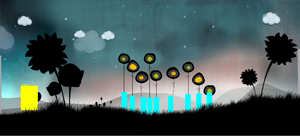
So in this file, there will be our level with all its graphics, animations, sounds… We will not have anymore external datas. Moreover our level in the flash IDE will not contain only rectangle shape like previously, but our graphics and animations :
Screenshot of the level
It’s more user friendly isn’t it ? My hero is always a rectangle shape because I’ve not the orignal fla right now.

So to do that just import your graphics and animations into your fla’s library. I recommend to create a movie clip named Level and put it on the stage, name it and add a simple trace code into it to inform what is your current level. We will add all our layers and objects in!
Then put the graphics inside your original Background movie clip for example. Next, inside the movie clip’s properties check export for ActionScript3 and set as class Background. Finally add this code into the movie clip :

var className = "com.citrusengine.objects.CitrusSprite";
var params = {
	view: Background
}

Before, we had a background.jpg now we have a class!

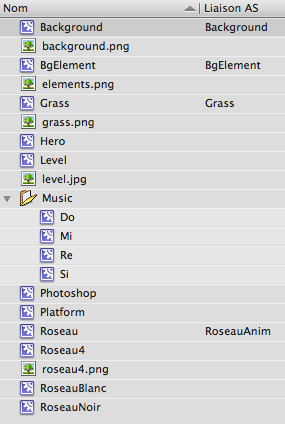
For animation it’s the same, but be careful : if you use it in code after it may have a problem of duplicate name, so in my case with the “Roseau” animation, my view is set up as RoseauAnimation. My library :
library screenshot

Now that your level is set up export it as SWC, then import it in your project. And finally to create your level in the Citrus Engine :

package {
 
	import com.citrusengine.core.CitrusEngine;
 
	import LevelA1_fla.Level_1;
 
	public class Main extends CitrusEngine {
 
		public function Main() {
 
			super();
 
			state = new GameState(new Level_1());
		}
	}
}

Et voilΓ ! You can download my zip. There is still the problem with hero deplacement coming from the new version, anyway if you start a new project from scratch with this one, all will work fine!

Now you just have to import sounds/videos in your SWC too…
Be careful if you use a SWC and target the Web, because the swf becomes heavy and if there isn’t an external preloader, people may leave before played your game!

Finally if you want to have great performance on your mobile game, you should take a look on CE blitting method. And you may use Embed metadata tags to add your assets to your game state. I recommend to add them directly in your class, don’t use the level editor. Programming is not always easy πŸ˜‰

Rugby game, AS3 – CE – haXe versions

Two weeks ago at school we made a simple rugby game with graphics provided.
I take this opportunity to compare how I develop the game if I use different framewok :

– in AS3 with linked list and object pooling (refers to this previous tutorial). Obviously it is a little game, and we don’t need complex optimization, but that was a good implementation exercice. Moreover I’ve updated my class πŸ˜‰

– with the Citrus Engine, managing Box2D. It was not easy to handle physics to have the same result that the basic AS3 version, and actually it is not the same (there is some inertia), but I really like how Box2d handle collision. We can manage before collision, the beginning and the ending. It is really more precise than a hitTestObject. Moreover we can separate art from physic body, and so change easily the “collision box”.

– last night, with lbineau we made a programming evening around haXe (and some beers πŸ™‚ ). The idea was really simple : make the same game, using existing AS3 classes with haXe. I have already given a chance to haXe previously and saw how powerful it is. This time, I see how easy it is to use previous AS3 code. I didn’t rewrite my Opponent and Player class! And I used the fla to link graphics without any trouble! However I’m a bit disappointed : I used most of the time original AS3 objects instead of haXe primary objects. What I need right now is FDT5 with its full haXe support! Can’t wait for it… Oh! If you’re interesting by haXe, you should take a look on NME, it seems to be amazing.

The zip with the three versions.

Introduction to Embed art in the Citrus Engine

Update : using metadata tag Embed is not the easiest path if you want to target iOS, take a look on this post using SWC.

Today this is a quick post based on an older one : Create objects and art in the citrus engine.

If you want to target iOS platform for your game, you must know that you can’t load swf at runtime. Indeed all your data must be “packaging” in one file an .ipa. So you are not able to load external data. To pass over that restriction, you need to use the metadata tag Embed properties. This is a blog post for Embedding Ressources with AS3.

So, what we will do today is to adapt the previous post to be able to target iOS. I don’t have enough time to do it entirely, so this will only be an introduction, sorry.

Let’s start now : on your level.fla add AS code to embed some assets :

[Embed(source="../../assets/grass.png")]
var GrassPic:Class;
Grass.picture = GrassPic;
 
[Embed(source="../../assets/elements.png")]
var BackgroundElementPic:Class;
BackgroundElement.picture = BackgroundElementPic;
 
[Embed(source="../../assets/background.png")]
var BackgroundPic:Class;
Background.picture = BackgroundPic;
 
[Embed(source="../../assets/objects/Roseau.swf")]
var RoseauAnim:Class;
Roseau.animation = RoseauAnim;

Here we are using the dynamic property of MovieClip, more information about it : Adobe doc. Don’t forget to name your stage MovieClip!
Then into your background MovieClip add this code :

var className = "com.citrusengine.objects.CitrusSprite";
var params = {
	view: this.picture
}

Don’t forget the this or it will not work! Now, your asset is embed πŸ˜‰
It is really easy to embed graphics, but what about SWF ? How can we handle animation on this ?

Go back into our two older methods : roseauTouche & roseauFin. And change the code for :

private function _roseauTouche(cEvt:ContactEvent):void {
 
	if (cEvt.other.GetBody().GetUserData() is Hero) {
 
		 ((MovieClip(SpriteArt(view.getArt(cEvt.fixture.GetBody().GetUserData())).content).getChildAt(0) as DisplayObjectContainer).getChildAt(0) as MovieClip).gotoAndPlay("white");
	}
}
 
private function _roseauFin(cEvt:ContactEvent):void {
 
	if (cEvt.other.GetBody().GetUserData() is Hero) {
 
		var roseauMC:MovieClip = MovieClip(SpriteArt(view.getArt(cEvt.fixture.GetBody().GetUserData())).content);
		var loader:Loader = roseauMC.getChildAt(0) as Loader;
		var mc:MovieClip = (loader as DisplayObjectContainer).getChildAt(0) as MovieClip;
		mc.gotoAndPlay("black");
	}
}

Dammit!! It is the same code for this two functions, the first is just more condensed. I will not explain more, because I’m always surprised of those lines… πŸ˜€ However you can find informations here and there.

My zip. There is some problem with hero movement (jump and move to travel) due to the update on the last CE’s version. I don’t know where it comes from, but you can use it without problem. I made some test from scratch and it works πŸ˜‰

I know that there is lot of works to do from there, but that’s a good start. You need to put your level into an asset in your state finally, and see what happen. You would write a new function to ObjectMaker to enable that, probably.

I wouldn’t dig into it more, because I’m not sure it is the best way… It is a bit complex if you want to manage animation. The updateAnimation method of PhysicsObject class doesn’t work this way. And moreover there is an other method to embed data :
“Remember you can specify a MovieClip linkage ID as your view property rather than a path to a SWF/PNG. If you’re using Flash Develop, FDT or Flash Builder, you can embed your MovieClip graphics that you made in the Flash IDE using SWCs”.

Anyway that was a cool introduction to embed assets, isn’t it ?

Doubly linked list and object pooling

After holidays, it’s time to get back to work πŸ™‚
I was really busy last month, so this is some news on what I did and what is going on :

– I’ve made some experiments with the Citrus Engine on the Hero adding some functionality. But what appears is the Hero class becomes more and more complex… So I asked its creator if he knows a system/model which has a modular way to add features to the hero. And he gives me some information about the Entity/Component model. Woah, it is awesome! It’s really a new way of thinking about programming. No more OOP. This is 3 useful links/resources if you are interested : Gamasutra the Entity Component Model, Entity Systems are the future of MMOG development, Entity Systems. This links are very interesting, but there isn’t any implementation. You can find implementations with the PushButton Engine (flash), Artemis (java). However it is really complex, so I was not able to create a Component/Entity System for the CE due to my lack of experience… but if its creator has time, he will do!

– I was in holidays at Praha (Czech Republic), amazing city/country! And beer is really cheap πŸ™‚

– I’m currently reading the book of Jesse Schell, The Art of Game Design it’s a masterpiece! Really, really interesting, lots of awesome advices. Approved & Recommended!

– I’m working/designing my next portfolio. It will be nice… πŸ˜‰

– On Thursday 15 September, I go back to the Gobelins school! And I will make a point with Tiffany about Kinessia. We are thinking to create the game for mobile. I hope we will have enough time (there are already lots of project at school…), so stay tuned!

– Mobile, tablet and game design/programming is interesting me more and even more. This is two good links on mobile game programming : Starting with AIR for Android and iOS – building one app for both platforms, and Building mobile games in Adobe AIR – optimization techniques.

– And finally I’m also waiting FDT5 to invest more time in haXe and WebGL!

I think it’s enough for the news at the moment! Now it’s time to speak about the topic, this week I wanted to make some algorithms, doubly linked list and object pooling are a good exercice. Previously I made an oral in my school to introduce recurisivity and data structures (pdf link in french). Doubly linked list and object pooling are techniques optimizations used in game development and especially on mobile devices.

Continue reading Doubly linked list and object pooling